
Most code review checklists catch everything except the bugs that matter.
They're optimized for auditability, more precisely, for proving a process happened, not for catching the architectural decisions that become six-month cleanup projects or the security assumptions that become breach headlines. Reviewers stay busy counting characters in variable names while race conditions, memory leaks, and coupling problems sail through untouched.
The checklist gets checked. The bug ships anyway.
This article provides a comprehensive code review checklist, but one designed around judgment prompts rather than binary checkboxes. Each item requires thinking about the specific code being reviewed, not just pattern-matching against common issues.
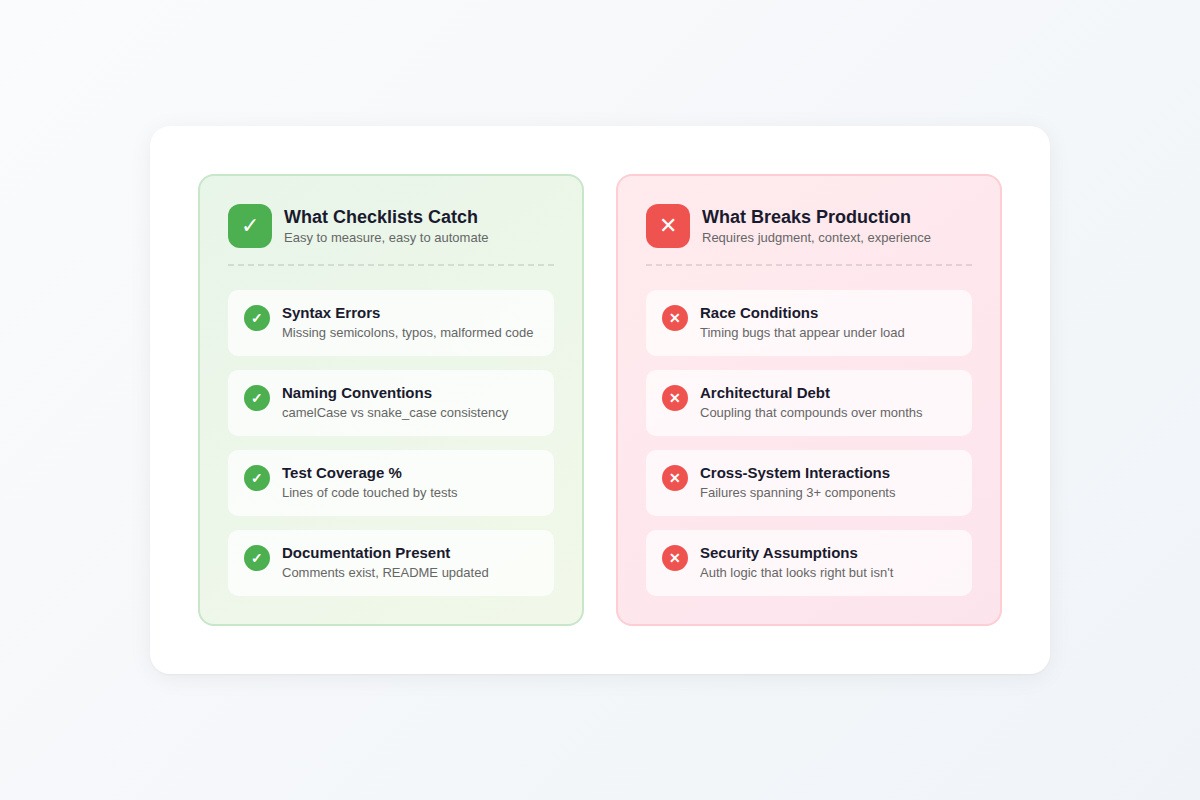
Why most code review checklists fail
Every engineering team has seen the pattern. A pull request passes a 50-item checklist with flying colors. Null checks verified. Test coverage above threshold. Naming conventions consistent. Every box checked.
Then the code ships a bug that takes down production for hours.
The checklist even included an item about that exact bug category. Someone checked it off. The reviewer scanned for the obvious patterns that category implies and found nothing obviously wrong. What the checklist couldn't capture was the actual failure mode — which required understanding how three different systems interacted under load, not whether a specific code pattern was present.
Here's what happens next: post-mortem identifies the gap, someone adds a new checklist item, the list grows to 60, then 80 items. Teams layer on tooling — automated checks, required fields in PR templates, blocked merges until every box has a checkmark.
The bugs don't stop. They shift categories. Teams stop missing things on the list and start missing everything the list didn't anticipate.
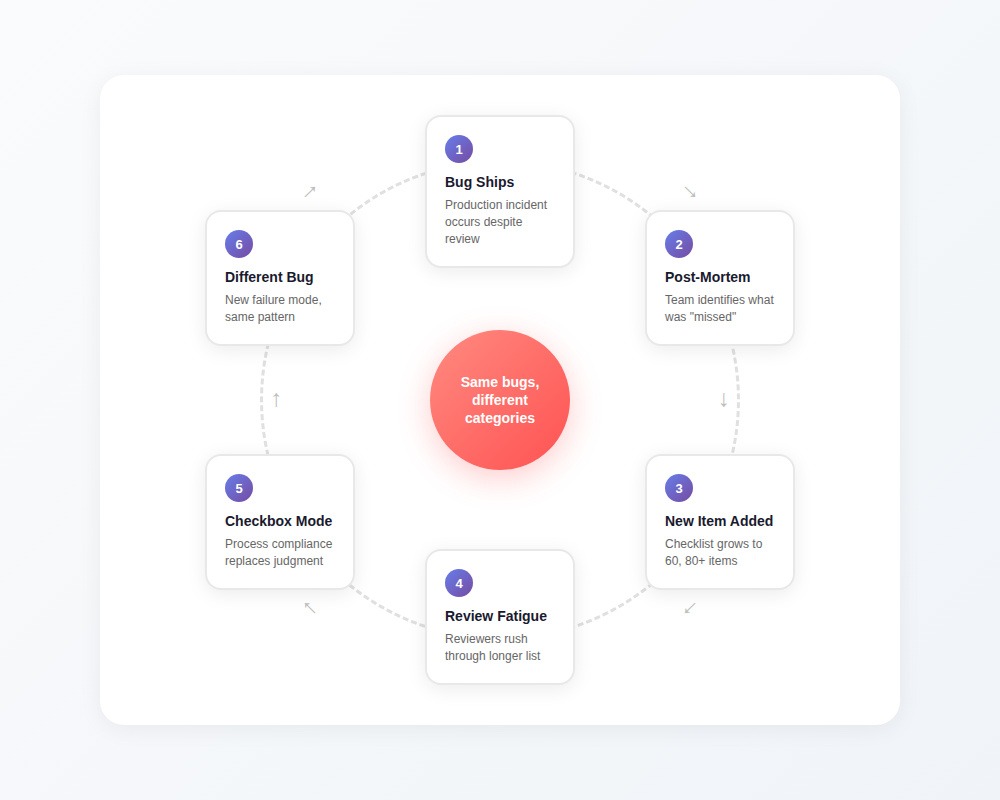
The dangerous part isn't that checklists fail to catch everything, that's expected. The dangerous part is that finishing the checklist feels like finishing the review. The cognitive work stops. The process becomes a substitute for judgment.
The difference between checkbox items and judgment prompts
The difference between "error handling verified" and "what happens when this breaks at 3 AM" is the difference between checking a box and doing a review. The first takes three seconds, but the second requires understanding what this code actually does.
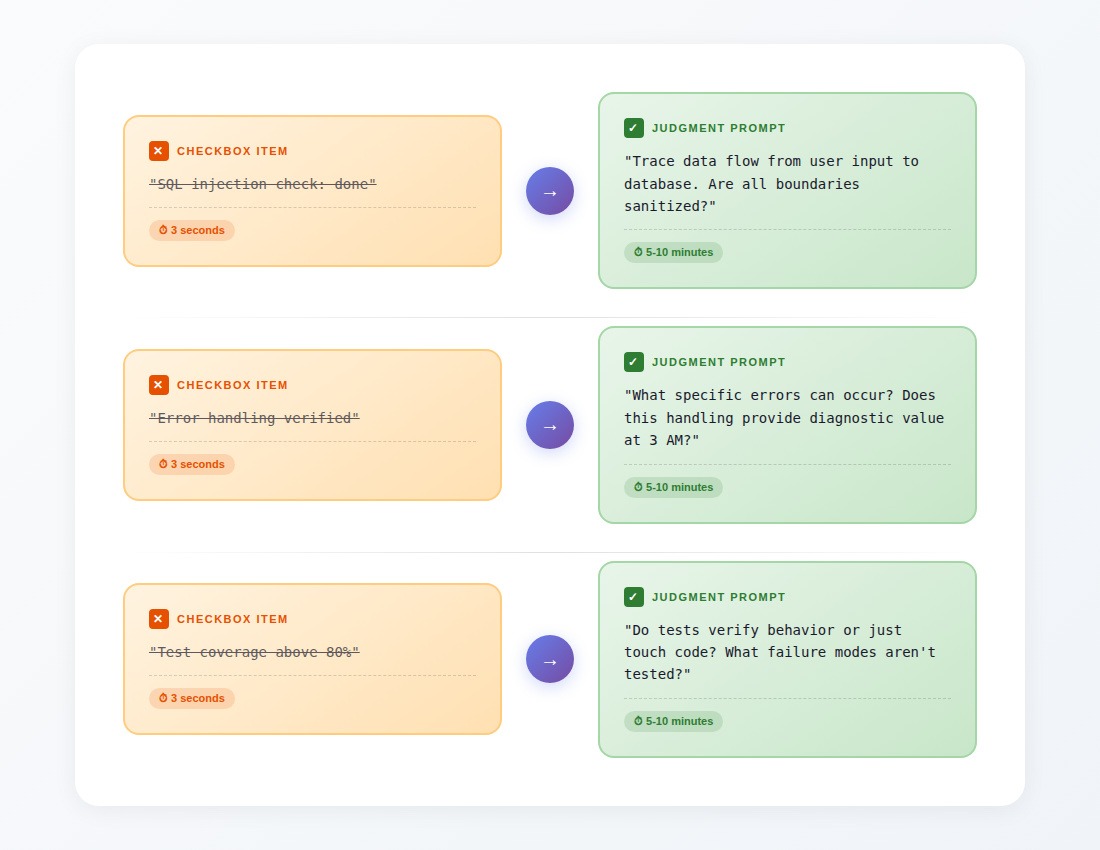
Syntactic correctness and semantic appropriateness are distinct problems. A linter verifies naming conventions. Type checkers find unsafe operations. But determining whether this abstraction makes sense here, whether this performance optimization is worth the complexity cost, whether this caching strategy matches this service's access patterns, that requires judgment that doesn't fit into binary checkboxes.
The checklist below is designed around judgment prompts. Each item requires you to think about the specific code being reviewed and arrive at an answer that depends on context. They can't be checked off in three seconds because they require actually understanding what the code does.
The complete code review checklist
This checklist covers eight areas of review: context-setting, logic, security, architecture, performance, testing, maintainability, and deployment.
Pre-review context (answer before reading code)
Before diving into the code, establish the context that will calibrate your review:
Your answers determine how deeply to apply each section below.
Logic and correctness
These items catch the bugs that make code behave differently than intended.
Boundary conditions
- What happens when the input is empty? (Empty array, null, empty string)
- What happens with exactly one item? Two items? (Boundary cases that often break)
- Are there numeric boundaries being handled? (Zero, negative numbers, MAX_INT, floating point precision)
- For date/time logic: what happens at midnight? Month boundaries? Year boundaries? Leap years?
- For pagination: what happens on the first page? Last page? A page beyond the last?
State management
- If this modifies state, what happens if it's called twice in rapid succession?
- Are there race conditions possible between reading and writing state?
- If this operation fails midway, is the state left in a valid condition?
- Are there any assumptions about state that could be violated by concurrent operations?
Control flow
- Are all conditional branches reachable? Are any impossible to reach?
- For loops: can they run zero times? Is that handled correctly?
- For recursive functions: is there a guaranteed termination condition?
- Are early returns handled correctly? Do cleanup operations still run?
Error handling
- What specific errors can occur in this code path?
- For each error: does the handling provide enough information to diagnose the problem at 3 AM?
- Are errors being swallowed silently anywhere? (Empty catch blocks, ignored return values)
- Do error messages expose sensitive information? (Stack traces, internal paths, user data)
- If this calls external services: what happens when they're slow? Unavailable? Return unexpected data?
Security
These items catch vulnerabilities that checklist-style "security review: done" misses.
Input validation
- Trace all paths from user input to where it's used. Is it validated at every trust boundary?
- For database queries: are all parameters properly parameterized? (Not just "SQL injection check: done"—actually trace the data flow)
- For HTML output: is user-provided content properly escaped?
- For file operations: can user input influence file paths? Is path traversal possible?
- What happens if an attacker sends a megabyte of data where you expect a few characters?
Authentication and authorization
- Does this code verify the user is who they claim to be (authentication)?
- Does this code verify the user can access this specific resource (authorization)? (These are often confused)
- If this exposes data, can User A access User B's data by manipulating IDs or parameters?
- Are there any code paths that bypass authentication checks?
- For admin/elevated functions: is the authorization check happening on the server, not just hidden in the UI?
Data exposure
- What data is returned in API responses? Is any of it unnecessary for the frontend?
- What gets logged? Could logs contain passwords, tokens, PII, or payment information?
- What's included in error messages? Could they reveal system internals to attackers?
- For debugging/admin endpoints: are they properly secured or accidentally exposed?
Dependencies
- Are any new dependencies being added? What's their security track record?
- For existing dependencies with known vulnerabilities: does this code use the vulnerable functionality?
- Are secrets, API keys, or credentials hardcoded anywhere?
- For external API calls: are connections using TLS? Are certificates being validated?
Architecture and design
These items catch the decisions that work today but become expensive to unwind.
Module boundaries
- Does this change respect existing architectural boundaries, or does it reach across layers?
- Can this module's purpose be understood without reading three other files?
- Does this introduce circular dependencies?
- If this adds new coupling between components: is that coupling justified by the functionality?
Data flow
- Where does data transformation happen? Is it at the appropriate layer?
- Can you trace the shape of data at each point in the flow, or is it ambiguous?
- Are there multiple sources of truth for the same information?
- If this adds caching: does the cache invalidation strategy match how the underlying data changes?
Abstraction quality
- Does this abstraction hide complexity or just move it?
- Will this abstraction still make sense if requirements change in predictable ways?
- Is this solving today's problem or a hypothetical future problem? (YAGNI consideration)
- Could this be simpler while still solving the actual requirement?
Technical debt
- Does this change make the codebase easier or harder to modify six months from now?
- Are there TODO comments or workarounds that will never get addressed?
- Is this duplicating logic that exists elsewhere? Should it be consolidated?
- If this is a "temporary" solution: what's the plan to replace it?
Performance
These items matter for code paths where performance is relevant (answer the pre-review context questions first).
Resource usage
- Does memory usage scale with input size? Is there an upper bound?
- For database queries: what's the query plan? Are appropriate indexes being used?
- Are there N+1 query patterns? (One query to get a list, then N queries in a loop)
- For external API calls: are they batched appropriately, or making excessive round trips?
Scalability
- What happens at 10x current load? 100x?
- Are there operations that hold locks for extended periods?
- If this times out or gets slow, does it degrade gracefully or cascade into broader failure?
- For background jobs: what happens if they back up? Is there a queue that could grow unbounded?
Efficiency trade-offs
- If this optimizes for performance: is the added complexity worth it at current scale?
- If this isn't optimized: will that matter at expected scale within the code's lifetime?
- Are expensive operations happening in hot paths that could be moved or cached?
Testing
These items evaluate whether tests actually verify behavior rather than just touching code.
Coverage quality
- Do tests verify behavior or just execute code paths?
- Are error conditions tested, or only happy paths?
- For boundary conditions identified above: do tests cover them?
- If mocking is used: do mocks reflect realistic behavior of the mocked components?
Test maintainability
- Will these tests break if implementation details change but behavior stays the same?
- Are test names descriptive enough to understand failures without reading test code?
- Is test setup so complex that the tests are harder to understand than the code?
Missing sests
- What would a malicious user try? Is that tested?
- What's the most likely way this code will break in production? Is that tested?
- Are integration points with external systems tested with realistic failure scenarios?
Maintainability and readability
These items determine whether future developers (including future you) can understand this code.
Code Clarity
- Can someone understand what this code does without extensive mental simulation?
- Are variable and function names accurate to what they actually represent?
- For complex logic: is it structured so each piece can be understood independently?
- Are comments explaining why (valuable) rather than what (usually not valuable)?
Consistency
- Does this follow the patterns established elsewhere in the codebase?
- If it deviates from conventions: is the deviation justified and documented?
- Will a new team member be confused by inconsistencies this introduces?
Documentation
- For public APIs: is the contract clear to callers without reading the implementation?
- For complex business logic: is the business context documented?
- For workarounds or non-obvious code: is there an explanation of why it's necessary?
Deployment and operations
These items catch issues that only appear in production environments.
Configuration
- Are there environment-specific configurations that could cause this to behave differently in production?
- For new configuration options: what happens if they're missing or invalid?
- Are defaults safe, or could missing configuration cause failures?
Observability
- When this fails in production, will there be enough information to diagnose it?
- Are appropriate metrics, logs, or traces being emitted?
- For new features: can they be monitored to verify they're working as expected?
Rollback safety
- Can this change be rolled back safely if problems are discovered?
- For database migrations: are they backward compatible with the previous code version?
- For feature flags: if the flag is toggled, does the system remain consistent?
Using the code review checklist effectively
This checklist has 80+ items. That doesn't mean every review should evaluate all of them.
The pre-review context questions calibrate which sections matter most:
- Quick fix to logging code? Focus on maintainability, skim security, skip performance.
- New payment processing logic? Every security and logic item gets careful attention.
- Performance optimization PR? The performance section becomes the primary focus.
The checklist works as a menu of considerations, not a sequential process. Experienced reviewers develop intuition for which items matter for which types of changes. The list ensures nothing critical gets overlooked when it does matter.
Time investment
Thorough reviews take time. That's not inefficiency, it's investment.
A review that catches architectural problems before they ship costs 30-60 minutes. Catching the same problem in production costs 10+ engineering hours plus user impact. The math is straightforward: time spent in review is time not spent in incident response.
Teams that track both review time and incident frequency find that rushing reviews doesn't save time, it relocates cost to a moment when paying becomes far more expensive.
The five-minute test for your current process
Pull up your last five production incidents. For each one:
- Did the code that caused it pass review?
- If yes: which items from this checklist would have caught it?
- Were those items in your current process?
If most incidents trace to reviewed code, your process documents that review happened without catching what matters. The checklist creates coverage only when reviewers actually engage with the items that apply to each change.
Code review judgment and AI training
The judgment developed through effective code reviews directly translates into AI training work. Distinguishing meaningful issues from noise, understanding context, and reasoning about edge cases are exactly what's scarce in this field.
Demand is spiking for people who can evaluate code that models generate, explain why one implementation approach works better than another, and identify when a model's reasoning breaks down. The same skills that catch architectural problems in pull requests catch reasoning problems in model outputs. The contextual judgment that makes someone valuable as a reviewer makes them valuable in this emerging market.
Contribute to AGI development at DataAnnotation
The same pattern that separates effective code reviews from checkbox theater applies to AI training data. Quality comes from evaluators who understand what actually matters versus what's easy to measure.
Technical expertise, domain knowledge, or the critical thinking to evaluate complex trade-offs all position you well for AI training at DataAnnotation.

Over 100,000 remote workers have contributed to this infrastructure. Getting started takes five steps:
- Visit the DataAnnotation application page and click "Apply"
- Fill out the brief form with your background and availability
- Complete the Starter Assessment, which tests your critical thinking skills
- Check your inbox for the approval decision (typically within a few days)
- Log in to your dashboard, choose your first project, and start earning
No signup fees. DataAnnotation stays selective to maintain quality standards. You can only take the Starter Assessment once, so read the instructions carefully before submitting.
Apply to DataAnnotation if you understand why quality beats volume in advancing frontier AI.
.jpeg)