
AI code analysis catches bugs that traditional testing misses. Not occasionally, rather consistently. SQL injection patterns, null pointer exceptions, common race conditions, basic security vulnerabilities. These get flagged reliably across thousands of commits because AI doesn't get tired, doesn't rush before a deadline, and doesn't miss obvious patterns on the fourth code review of the day.
That's the genuine value. Teams using AI-powered code analysis report catching issues earlier, reducing time spent on mechanical verification, and freeing human reviewers to focus on business logic and architectural decisions instead of hunting for missing null checks.
The catch: AI reliability tools work well within their training distribution and fail outside it. They catch common vulnerability patterns with high consistency, then miss domain-specific issues, business logic errors, and cross-system bugs that don't match training data. Understanding where these tools help and where they create false confidence determines whether they improve your reliability or just generate noise.
This article covers what AI reliability tools actually deliver, which tools work for which use cases, and how to implement them without the false confidence that leads to worse outcomes than no tooling at all.
What do AI code reliability tools deliver?
AI code analysis reliably catches what it's seen before. Buffer overflows, SQL injection, XSS, basic memory errors; these get flagged consistently because millions of examples exist in training data. The model recognizes the pattern and fires.
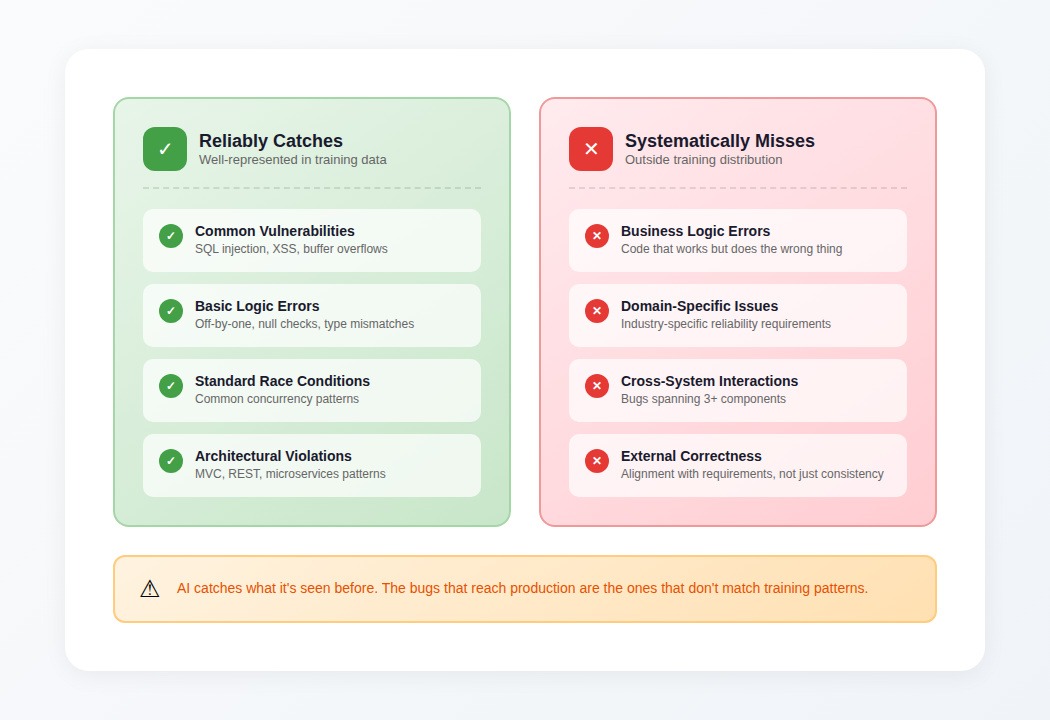
Pattern recognition in common vulnerability classes
For well-represented bug classes, AI tools provide genuine value:
- Security vulnerabilities: SQL injection, XSS, buffer overflows, basic authentication flaws
- Basic logic errors: Off-by-one, null pointer dereferences, type mismatches
- Standard race conditions: Common concurrency antipatterns in well-known frameworks
- Architectural violations: MVC separation, REST conventions, microservices boundaries
These categories get caught reliably because training data is abundant. A tool like GitHub's CodeQL, Snyk, or SonarQube's AI-assisted rules will flag these patterns with high consistency.
Automated test generation
For basic test generation, AI accelerates what's essentially mechanical work. Tools like GitHub Copilot, Tabnine, and Codium generate test scaffolding significantly faster than writing from scratch when the happy path is well-defined.
The limitation is that AI-suggested tests often duplicate existing coverage patterns rather than strengthening actual verification. The models analyze which lines execute but can't reason about whether tests verify behaviors that matter.
Code review assistance
AI tools identify certain logical error classes reliably: incorrect Boolean logic, mismatched operations, missing null checks. Tools like Amazon CodeGuru, Snyk Code, and Sourcegraph Cody catch these patterns consistently.
Where they break is in understanding developer intent. A function that calculates user permissions might execute without errors but implement the wrong business logic. The AI reviewer can't catch this because the error isn't in internal consistency, it's in alignment with requirements that exist outside the code.
The tool landscape: what's available
Static analysis with AI augmentation
Tools: SonarQube, Snyk Code, Semgrep, CodeClimate
What they do: Pattern matching against known vulnerability databases, enhanced with ML for detecting variants. Good for security scanning, code smell detection, and enforcing style consistency.
Best for: CI/CD integration, catching known vulnerability patterns, maintaining coding standards across large teams.
AI-assisted code review
Tools: GitHub Copilot, Amazon CodeGuru, Sourcegraph Cody, Codium
What they do: Analyze pull requests for potential issues, suggest improvements, generate tests. Variable accuracy depending on code complexity and how well the patterns match training data.
Best for: First-pass review of straightforward changes, test generation for well-defined features, catching common mistakes before human review.
Specialized reliability analysis
Tools: Infer (Facebook), CodeQL (GitHub), Coverity
What they do: Deep static analysis for specific bug classes — memory safety, concurrency issues, security vulnerabilities. More focused than general AI assistants but higher precision within their domains.
Best for: Security-critical codebases, systems programming, compliance requirements.
Where AI reliability tools systematically fail
The capabilities above mask a troubling pattern. The same tools that catch obvious issues consistently fail at the boundaries where expertise matters most.
The dangerous reliability curve
Here's the pattern that causes problems: AI catches the obvious stuff so reliably that teams start trusting it as a backstop. Gradually, human review becomes cursory on categories where the AI "has it covered."
Then the tool misses a subtle issue, in exactly the category where human review had become sparse. The failures cluster precisely where they hurt most.
Models handle straightforward cases with remarkable consistency: null pointer checks, basic race conditions, common API misuse. Then they hit edge cases requiring contextual judgment, and performance collapses. The aggregate accuracy numbers look good. The failures concentrate in scenarios that actually matter.
What tools can't see
- Business logic errors: Code that executes correctly but does the wrong thing. The AI has no access to requirements, specifications, or domain knowledge that exists outside the codebase.
- Cross-system interactions: Bugs that emerge from how three or more components interact. Models analyzing single files or even single repositories miss integration failures — the distributed tracing you'd use to debug these issues in production doesn't exist in static analysis.
- Domain-specific reliability: Industry-specific requirements—financial calculation precision, healthcare data handling, aerospace safety margins—that don't appear in general training data.
- External correctness: Whether code aligns with what it should do, not just whether it's internally consistent.
The false positive trap
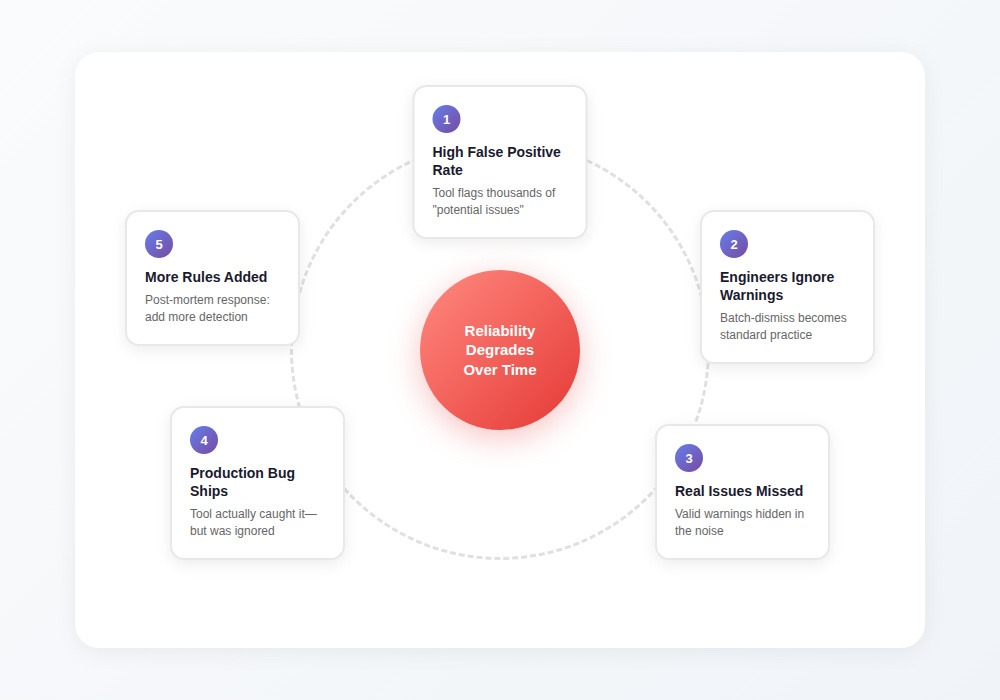
High false positive rates create a corrosive cycle:
- Tool flags thousands of "potential issues"
- Most turn out to be non-problems
- Engineers start batch-dismissing warnings
- Valid warnings get lost in the noise
- Real issues ship to production
- Post-mortem adds more detection rules
- False positive rate increases further
The tool that cried wolf loses its value. Teams with high false positive rates often have higher false negative rates in production and not because the tool missed issues, but because engineers stopped paying attention.
How to use AI reliability tools effectively
The failure modes are predictable. That makes them avoidable with the right approach.
Match tool type to use case
- For security scanning: Use specialized tools (CodeQL, Semgrep, Snyk) rather than general AI assistants. These tools have lower false positive rates within their domains because they're optimized for precision over breadth.
- For code review assistance: Use AI as a first pass, not a final check. Let the tool catch obvious issues so human reviewers can focus on business logic, architectural decisions, and domain-specific requirements.
- For test generation: Use AI to scaffold tests quickly, then review what's actually being verified. Add tests for edge cases and failure modes that the AI won't think to generate.
Configure for precision over recall
Most tools default to high sensitivity (catch everything, accept many false positives). For sustained use, tune toward precision:
- Disable rules with historically high false positive rates
- Configure severity thresholds to surface only high-confidence findings
- Create allow-lists for patterns that are safe in your specific codebase
A tool that surfaces 10 real issues from 15 warnings gets used. A tool that surfaces 10 real issues from 500 warnings gets ignored.
Don't reduce human review based on AI coverage
The most dangerous response to AI reliability tools: "The AI will catch that, so we don't need to look as carefully."
AI catches what matches training patterns. Your domain-specific issues, your architectural decisions, your business logic, all of these exist outside those patterns. Keep human review thorough on:
- Business logic changes
- Security-sensitive code paths
- Cross-service integration points
- Performance-critical sections
Track what the tools really catch
Most teams don't measure whether their AI tools provide value. Track:
- Issues caught: What did the tool flag that would have shipped otherwise?
- False positive rate: What percentage of warnings required no action?
- Production escapes: What reached production that the tool could theoretically have caught?
If your false positive rate exceeds 80%, the tool is training your team to ignore it. If production escapes are high in categories the tool claims to cover, recalibrate expectations.
Why training data quality determines the ceiling
The accuracy of AI reliability tools gets determined during training, not during use. That ceiling comes down to the quality of examples the model learned from.
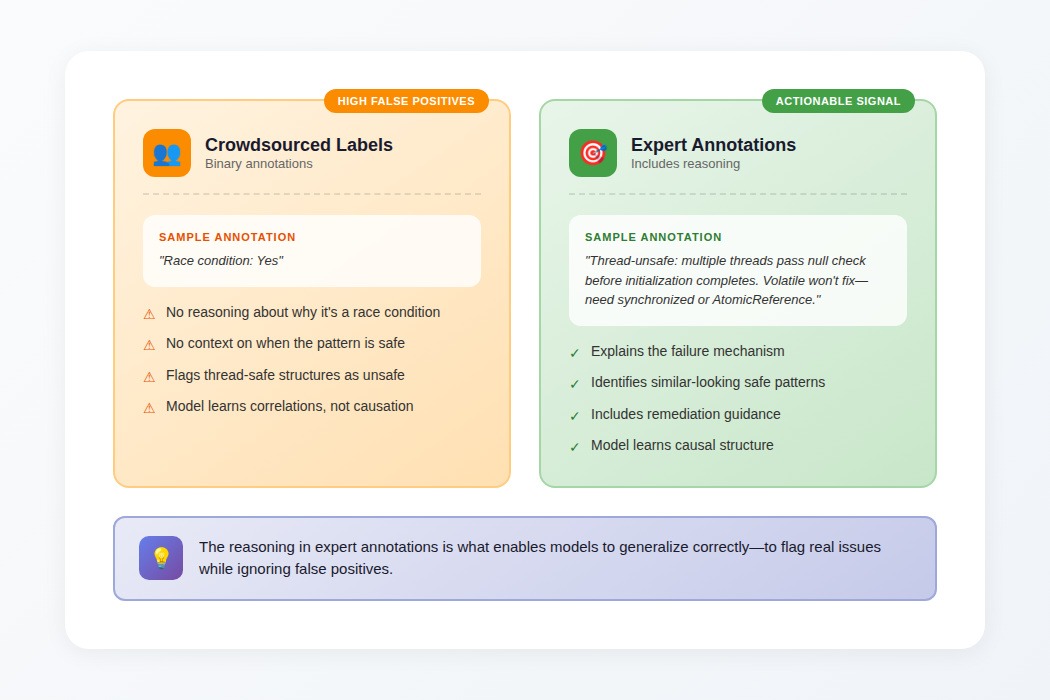
The difference expert annotations make
When a crowdsourced annotator labels a code example as having a concurrency bug, the annotation is binary: bug present or not.
When an expert does it, the training data includes reasoning: "This lazy initialization is thread-unsafe because multiple threads could pass the null check before any completes initialization. Volatile won't fix it; you need synchronized blocks or AtomicReference."
That reasoning enables models to generalize correctly. Without it, models learn correlations that produce high false positive rates. With it, they learn the causal structure that distinguishes real issues from safe patterns that look similar.
Why this matters for tool selection
Tools trained on expert-curated examples consistently outperform tools trained on larger but noisier datasets:
- Higher precision (fewer false positives)
- Better handling of edge cases
- More accurate severity assessment
- Fewer baffling suggestions
When evaluating AI reliability tools, ask about training data quality—not just model architecture or benchmark scores. The tools that work in production are the ones trained on examples that captured expert reasoning, not just binary labels.
Contribute to AI reliability at DataAnnotation
The AI tools reshaping code reliability don't learn from synthetic examples or binary labels. They learn from real developers evaluating real code, identifying patterns that separate robust systems from brittle ones, explaining why certain patterns are dangerous while similar-looking patterns are safe.
The judgment that distinguishes genuine vulnerabilities from false positives, that identifies which race conditions and deadlocks matter and which are theoretical, that evaluates whether code meets requirements rather than just executing correctly — that judgment is what makes training data valuable.
Technical expertise, domain knowledge, or the critical thinking to evaluate complex trade-offs all position you well for AI training work at DataAnnotation. Over 100,000 remote workers contribute to this infrastructure.
Getting started takes five steps:
- Visit the DataAnnotation application page and click "Apply"
- Fill out the brief form with your background and availability
- Complete the Starter Assessment—it tests critical thinking, not checkbox compliance
- Check your inbox for the approval decision (typically within a few days)
- Log in to your dashboard, choose your first project, and start earning
No signup fees. DataAnnotation stays selective to maintain quality standards. The Starter Assessment can only be taken once, so read the instructions carefully before submitting.
Apply if you understand why expert judgment beats pattern matching—in evaluating code reliability and in training the tools that developers rely on.
.jpeg)