.png)
Almost every tech company has a wellness program. Guess what? Most developers are still burned out. 83% of developers experience burnout despite unlimited interventions, mental health days, and company-provided meditation apps.
The interventions fail because they treat burnout as an individual resilience problem rather than what it actually is: predictable organizational dysfunction.
We operate one of the world's largest AI training marketplaces — over 100,000 experts contributing to frontier AI systems that serve millions. No required meetings. No micromanagement. People work when their brains function optimally, disconnect when they need to, and choose projects that match their expertise.
And here's what managing that workforce taught us: the same organizational patterns that burn developers out are identical to problems we see in AI training at scale. Companies are optimizing for the wrong metrics and creating work that feels productive but produces nothing meaningful.
What is developer burnout?
The World Health Organization defines burnout as chronic workplace stress characterized by exhaustion, cynicism toward one's work, and declining effectiveness.
For developers specifically, that manifests as:
- Staring at code you wrote yesterday and not recognizing your own logic
- Merging pull requests at 11 PM because that's the only time you can focus
- Watching your test coverage percentage drop week after week because you're just trying to clear your queue
But here's what the clinical definition misses: developer burnout isn't equally distributed across all engineering roles. We've managed over 100,000 technical workers, and the pattern is clear — burnout concentrates in environments optimizing for the wrong metrics, where developers work incredibly hard on things that fundamentally don't matter.
The WHO definition treats burnout as an individual stress response, whereas it's a systems design failure that produces predictable outputs when organizations are structured incorrectly.
Stress vs. burnout vs. depression
These three conditions are constantly conflated, but the distinction matters because the solutions are entirely different.
Stress is acute and specific. For instance, the production bug at 2 AM, the deployment that broke staging, the technical debt you just discovered in a critical path. Your heart rate spikes, you fix the immediate problem, and you recover. This is normal and manageable.
Burnout develops slowly from sustained structural problems in your work environment. It's not the complex technical problem — it's that you solved it perfectly, then watched management ignore your solution, probably because it didn't align with some VP's architectural preferences.
Burnout signals "something is systematically wrong with how this work is structured." It's reversible, but not through individual willpower — through changing the conditions that cause it.
Depression is a clinical condition requiring professional treatment. It persists regardless of job circumstances. If you're experiencing pervasive sadness, loss of interest in activities you used to enjoy, or thoughts of self-harm, talk to a mental health professional immediately. Mental health resources for engineers provide starting points.
Here's the critical connection: untreated burnout can escalate into depression.
Signs and symptoms of developer burnout
Burnout symptoms cluster into patterns.
After working with thousands of developers who left traditional roles for our platform, here are some patterns that we've seen repeatedly:
The first sign isn't exhaustion — it's the realization that your work doesn't matter: You're shipping features, hitting sprint commitments, maintaining velocity. But you look at your past six months of work and can't identify a single thing that improved anyone's life. The exhaustion comes later, after months of pouring effort into arbitrary objectives.
Sleep stops being restorative: Perhaps you're getting seven or eight hours, but you wake up already drained. Opening your IDE triggers genuine dread. The context-switching between tickets has fragmented your ability to hold complex problems in your head. What used to take 30 minutes of focused work now takes hours of struggling through mental fog.
Cynicism replaces curiosity: Projects that would've excited you a few weeks ago now prompt immediate skepticism. Stand-ups transform from collaborative planning into performance theater, where you recite progress for managers who might not understand the technical work.
Your code quality deteriorates in ways you'd have caught months ago: For instance, unit tests get skipped, edge cases slip through, and you're merging "good enough" fixes to clear your queue instead of solving problems correctly. You know you're letting quality slide, but you're too exhausted to care.
Physical symptoms accumulate faster than you notice: Headaches can intensify. Sleep becomes fragmented despite the exhaustion. You catch every cold circulating in your team. Appetite swings between skipping meals during crunch and stress-eating at night.
How engineering culture creates developer burnout by design
Most developers aren't burning out from writing code. They're burning out from everything surrounding the code. Developer burnout persists because most engineering organizations are poorly designed from the ground up.
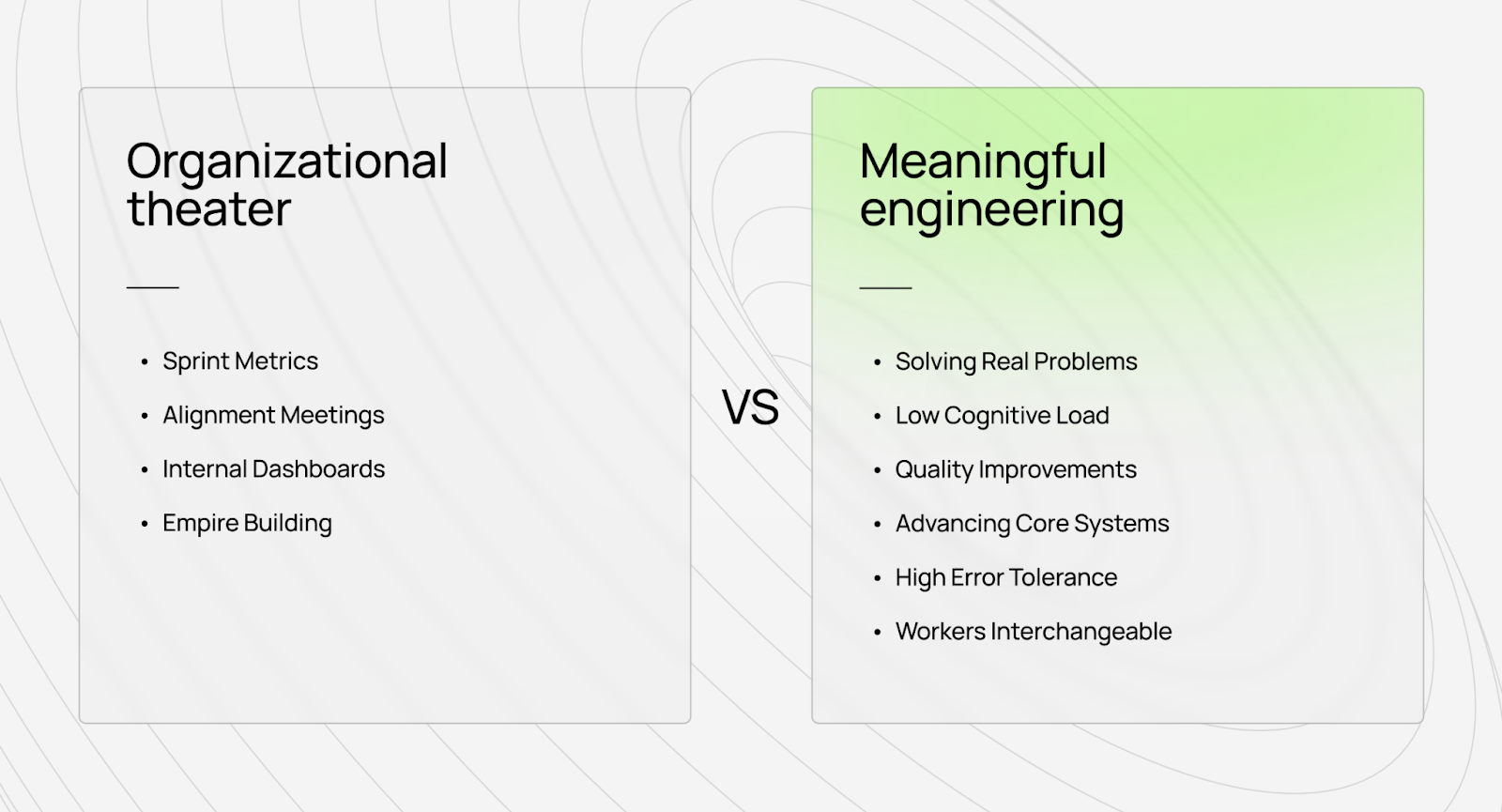
We've interviewed developers who left traditional roles for our platform, and the pattern is consistent: they loved engineering until the job became performing organizational theater for management.
The empire-building problem
Here's what happens at most tech companies: managers get promoted by growing their teams, not by solving more complex problems or shipping better products — by hiring more people.
For instance, a director can say they need to hire 50 more engineers. Why? To justify promotion to VP. What would these engineers do? Build internal tools to make the existing 200 engineers "more productive."
Why weren't the existing engineers productive? They spent 20% of their time interviewing candidates for the 50 new positions.
The cycle feeds itself. You hire people to solve productivity problems caused by hiring people.
Meanwhile, developers who wanted to write code watch their calendars fill with:
- Interviews that they didn't request
- Meetings about meetings about productivity tools
- Status updates for managers managing managers
- Alignment sessions to coordinate teams that shouldn't need coordination
Of course, developers will experience burnout.
The 90% problem nobody admits
Here's the uncomfortable truth we have learnt: at most tech companies, 90% of developers work on things that fundamentally don't matter.
Not "don't matter much." Don't matter at all.
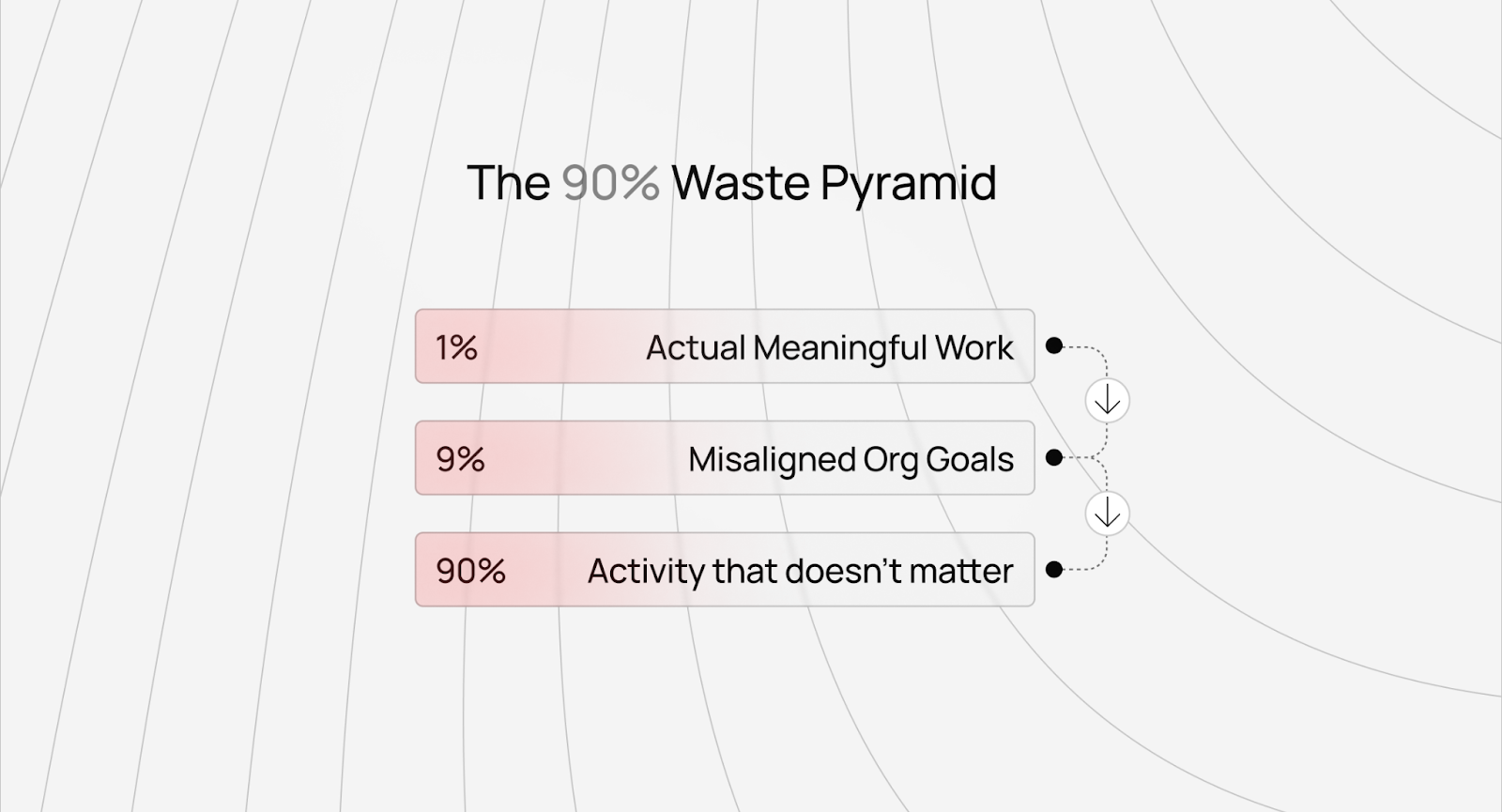
They're building internal dashboards that no one checks. Optimizing ad click-through rates by 0.3% and rewriting perfectly functional systems because a new VP wants their architectural philosophy reflected in the codebase. Creating features that product managers forget about two quarters later.
We've seen this in AI training too. For instance, companies will spend months gathering 20 million synthetic training examples, then realize that 95% of them were redundant noise and throw out 19 million examples. They were busy, metrics looked good, but the work didn't advance the actual goal.
The same thing happens in engineering organizations. Story points increase, velocity improves, and sprint commitments are met. But developers look at their work and think: "I haven't built anything meaningful in six months."
That realization (working hard on things that don't matter) destroys motivation faster than any deadline pressure.
When promotion incentives create developer burnout
The promotion system at most companies actively rewards behavior that burns people out.
Want to get promoted? Don't solve the most complex technical problem. That's risky and might fail.
Instead:
- Launch a new unnecessary service (adds complexity, doesn't matter if it's needed)
- Spearhead meetings for a cross-team initiative (more meetings, less code)
- Build a complex framework that other teams "should" adopt (creates evangelism work, not user value)
- Grow your team headcount (proves you're "leadership material")
The developers who refused to play this game and just wanted to solve technical problems excellently? They can stay at the same level for years, watching less capable engineers get promoted past them for being good at organizational theater.
This isn't sustainable. Eventually, you either leave, burn out trying to perform both jobs (actual engineering + promotion theater), or accept that meaningful technical work isn't what your company actually values.
Nobody optimizes for meaningful work
Here's the organizational design failure that creates burnout:
- Companies optimize for: Team growth, budget utilization, metric improvements
- Managers optimize for: Promotion visibility, stakeholder satisfaction, team expansion
- Engineers optimize for: Surviving performance reviews, appearing productive, avoiding blame
- Nobody optimizes for: Solving significant problems excellently
You would see this clearly at big companies. Teams would debate architectural decisions for weeks — not because the technical problems were complex, but because every senior engineer needed to weigh in to demonstrate their "technical leadership" for promotion.
The actual decision? It could've been made in an afternoon by whoever was building the thing. But that wouldn't generate enough visibility for six people's performance reviews.
What prevents developer burnout
After managing 100,000+ technical workers contributing to frontier AI development, we've learned what makes technical work sustainable.
None of it involves meditation apps.
Autonomy isn't a perk, it's infrastructure
Most companies treat autonomy as a cultural benefit. "We trust our engineers!" they say, then implement time tracking, mandate daily standups, and require approval for every technical decision.
Absolute autonomy requires infrastructure that makes micromanagement unnecessary.
At DataAnnotation, AI training workers don't have meetings because we built systems that measure quality right from day one.
This is the distinction between most data labeling companies, which just throw warm bodies at problems, and actual technology companies. They have no quality measurement, so they default to presence monitoring. Are people logging in? Attending meetings? Looking busy?
Technology companies build systems that detect quality. When you have those systems, you can give people actual autonomy because you're measuring outcomes, not activity.
If you want to give developers real flexibility, you need technology that answers the question "Is this code/solution/contribution excellent?" without extensive human oversight.
Otherwise, autonomy is just a nice-sounding policy that collapses under pressure.
Asynchronous work requires technology, not just policy
Every company claims to support "async work." Then someone asks a question in Slack and expects an answer in 15-30 minutes.
Real asynchronous work means you can disappear for eight hours and nothing breaks. That requires:
- Documentation that actually explains everyday things (not always "ask @sarah, she knows")
- Systems that surface context automatically (not "let's hop on a call to discuss")
- Quality measurement that doesn't require real-time feedback (not "can you review this PR today?" for the third time in a week)
- Projects scoped for independent completion (not "we need to sync with three other teams")
We built our platform from day one in complete asynchronous mode. Developers work when their brains function optimally — early morning, late night, weekends, weekdays, it doesn't matter. Projects exist in a queue. Take one, complete it excellently, submit it, and move to the next.
No Slack status monitoring. No "why weren't you at standup?" No pressure to respond within some arbitrary timeframe.
This isn't possible without technology. You need systems that route work intelligently, measure quality automatically, and provide context without requiring synchronous explanation. Most companies have the policy but not the infrastructure, so "async work" means "you can work weird hours, but you'll still have 20 meetings weekly."
Quality measurement replaces micromanagement
Micromanagement is a symptom of not knowing how to measure quality.
When most managers can't tell whether work is good or bad, they default to monitoring how work is done. “Did you attend the three meetings this week?” “Did you update the ticket?” “Did you respond to my message?” These become proxies for productivity because actual quality is unmeasurable.
Companies hire developers with impressive credentials (MIT degrees, FAANG experience, whatever), then don't trust them to work autonomously. Why? Because they have no way to evaluate the work itself, they assess the worker instead.
We see this in AI training all the time. Companies will hire people with PhDs in physics, then micromanage them because they can't measure whether the training data is excellent. They hired credentials, not craft, and have no system to evaluate craft, so they monitor activity.
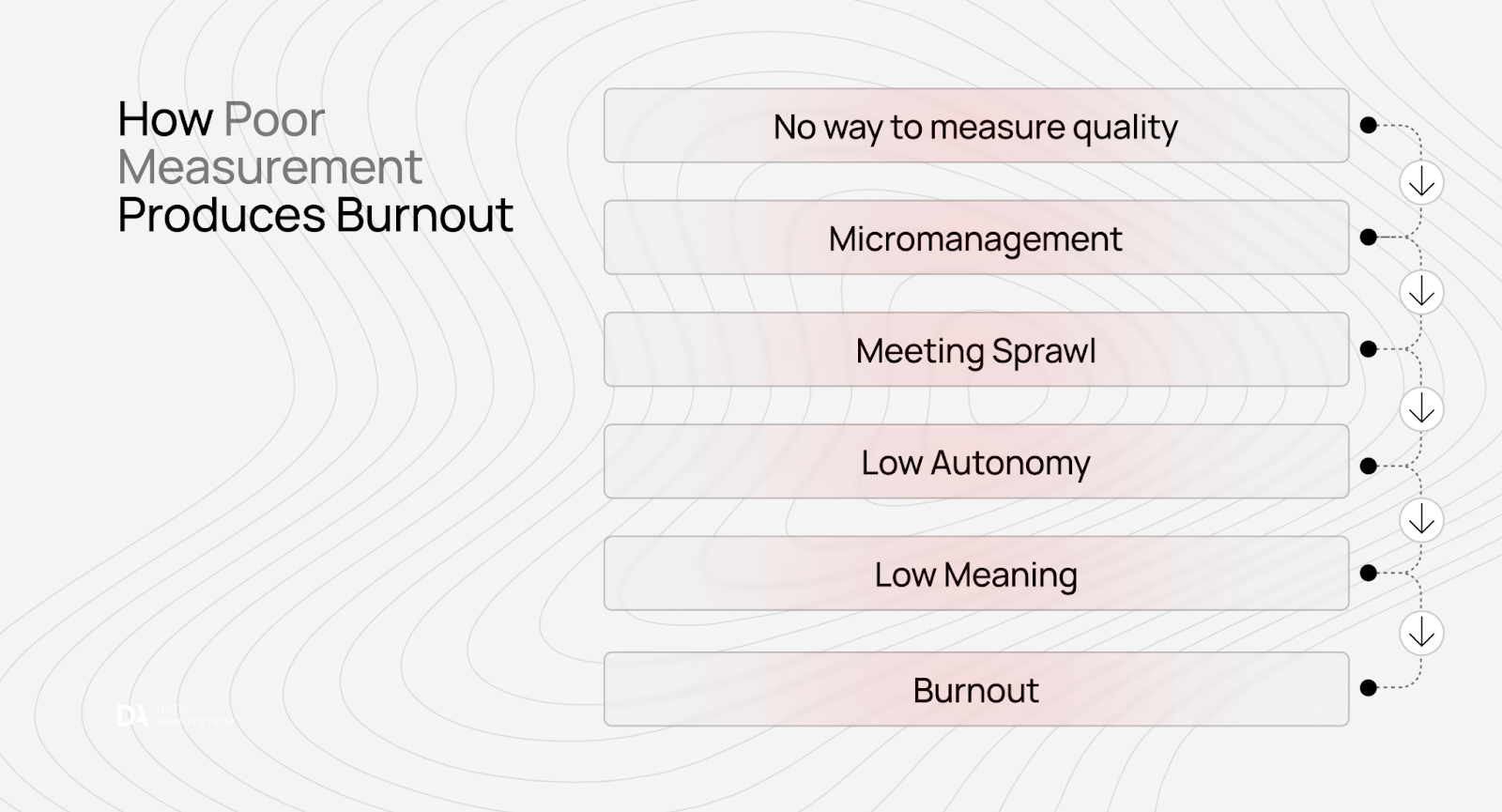
When you build real quality measurement processes that can tell you "this is excellent work" or "this needs improvement," micromanagement becomes unnecessary. You're evaluating outcomes, not performance theater.
That's why we can give AI trainers autonomy. We're not trusting vibes. We built systems and processes that measure quality at scale. The technology enables trust.
The alternative to developer burnout: flexible AI training for experts who want to contribute to AGI
AI training isn't mindless data entry. It's not a side hustle. We believe it's the bottleneck to AGI.
Every frontier model (the systems powering ChatGPT, Claude, Gemini, etc.) depends on human intelligence that algorithms cannot replicate. As models become more capable, this dependence intensifies rather than diminishes.
AI trainers on our platform work on problems advancing frontier AI systems. They're teaching models to reason about physics, write better code, and understand complex language. Their evaluations directly improve capabilities used by millions of people.
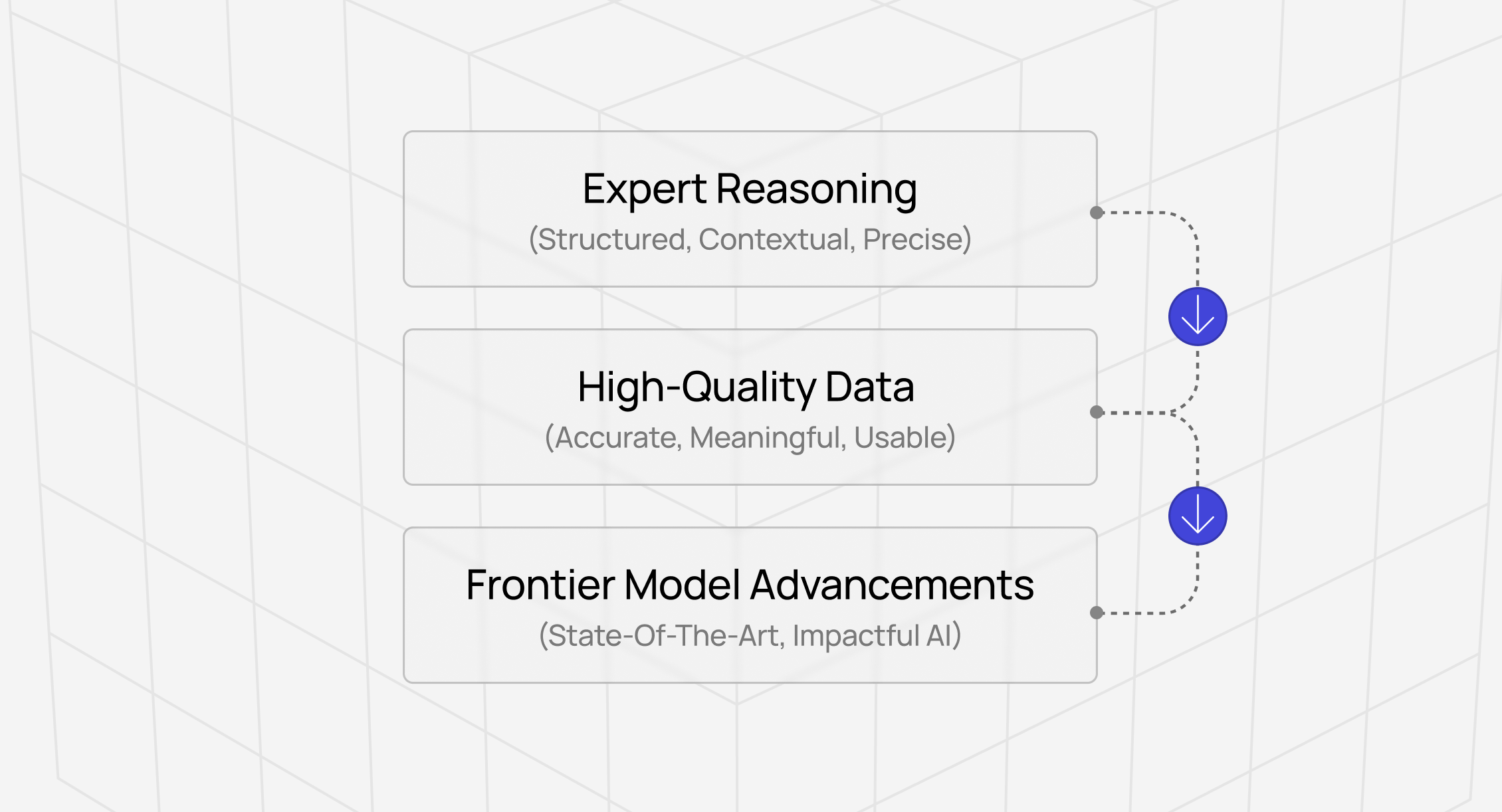
If you have genuine expertise (coding ability, STEM knowledge, professional credentials, or exceptional critical thinking), you can help build the most important technology of our time at DataAnnotation.
Who this work isn’t for
This work isn't for everyone — and that's intentional.
We maintain selective standards because quality at the frontier scale requires genuine expertise, not just effort. If you're exploring AI training work because you heard it's easy money that anyone can do, we’re afraid, this isn't the right platform.
If you're looking to maximize hourly volume through minimal-effort clicking, there are commodity platforms better suited to that approach. If credentials matter more to you than demonstrated capability, our qualification process can discourage you.
Qualification system
At DataAnnotation, we operate through a tiered qualification system that validates expertise and rewards demonstrated performance.
For coding projects (starting at $40/hour), it involves AI-generated code evaluation across Python, JavaScript, HTML, C++, C#, SQL, and other languages.
Entry starts with a Coding Starter Assessment that typically takes about 1 - 2 hours to complete. This isn't a resume screen or a credential check — it's a performance-based evaluation that assesses whether you can do the work.
Once qualified, you select projects from a dashboard showing available work that matches your expertise level. Project descriptions outline requirements, expected time commitment, and specific deliverables.
You can choose your work hours. You can work daily, weekly, or whenever projects fit your schedule. There are no minimum hour requirements, no mandatory login schedules, and no penalties for taking time away when other priorities demand attention.
The work here at DataAnnotation fits your life rather than controlling it.
Is the work hard? Yes. Does it require deep thinking? Absolutely.
Prevent developer burnout with specialized projects
If you're burned out by meaningless organizational theater and want to help advance technology, our platform offers a fundamentally different model. We're not a gig platform where you click through simple tasks for side income.
We're the infrastructure for training frontier AI systems and building the future.
If you want in, getting started is straightforward:
- Visit the DataAnnotation application page and click “Apply”
- Fill out the brief form with your background and availability
- Complete the Starter Assessment
- Check your inbox for the approval decision (which should arrive within a few days)
- Log in to your dashboard, choose your first project, and start earning
No signup fees. We stay selective to maintain quality standards. Just remember: you can only take the Starter Assessment once, so prepare thoroughly before starting.
Apply to DataAnnotation if you understand why quality beats volume in advancing frontier AI — and you have the expertise to contribute.
.jpeg)