
Every developer inherits code they wish they could rewrite. Legacy systems with nested conditionals eight levels deep. Functions that do twelve things poorly instead of one thing well. Variable names that made sense to someone in 2019 but now mean nothing.
Code refactoring tools promise to automate the cleanup. Some deliver but most generate syntactically correct transformations that are somehow worse than what you started with — code that's "technically refactored" but harder to maintain, introduces subtle bugs, or breaks implicit contracts nobody documented.
This article covers which refactoring tools get the job done, when to use each type, and how to avoid the failure modes that turn code improvement into code destruction.
What do code refactoring tools do?
Code refactoring tools restructure existing code without changing its external behavior. That definition sounds simple until you start defining "external behavior" in production systems — where it includes performance characteristics, error-handling patterns, timing of state mutations, and interactions with external dependencies.
The mechanical operations fall into recognizable patterns:
- Extracting methods to reduce duplication
- Inlining functions when abstraction obscures logic
- Renaming elements for clarity
- Moving functionality between modules
- Restructuring conditionals without altering outcomes
Automated tools excel at mechanical execution. They identify code duplication with perfect consistency, apply naming conventions without fatigue, and restructure conditional logic according to well-defined rules.
What they can't do is understand whether a particular refactoring preserves all the behavior that matters in your specific system.
The tool landscape: what's available and when to use each
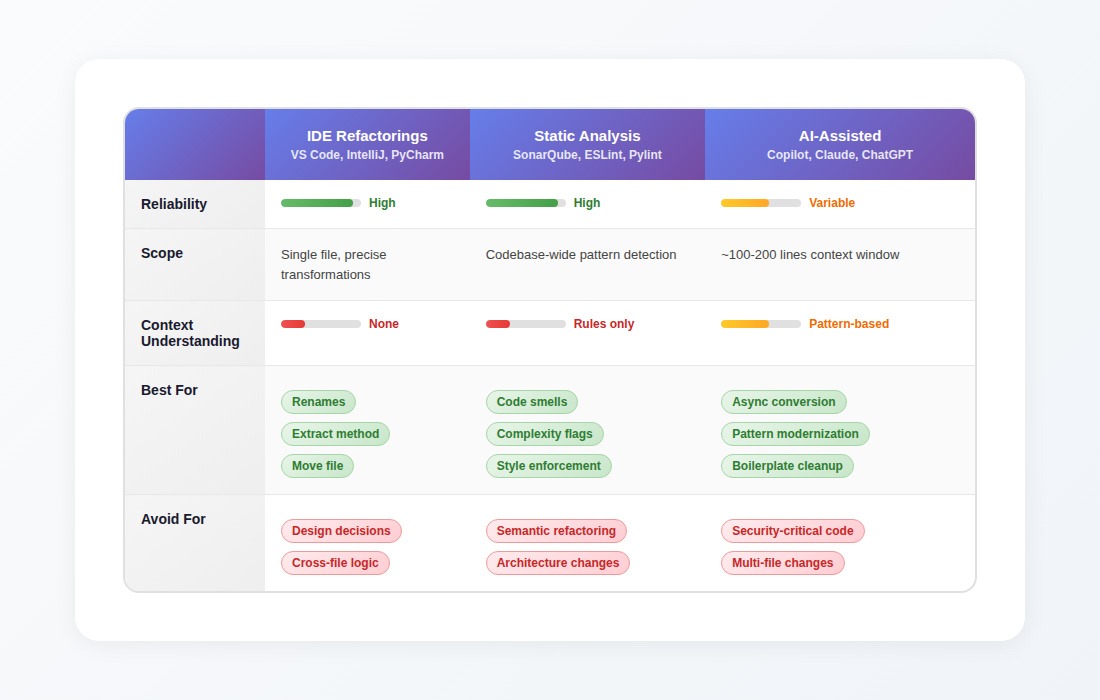
IDE-integrated refactorings
Tools: VS Code, IntelliJ, PyCharm, WebStorm, Eclipse
What they do well: Mechanical transformations with guaranteed correctness. When you rename a variable, the IDE parses your code's abstract syntax tree, identifies every reference with certainty, and updates them atomically. Extract Method analyzes data flow, determines which variables need to become parameters, and generates method signatures that preserve behavior.
Reliability: High. These tools solve narrow, well-defined problems and trade breadth for reliability.
Best for:
- Renaming variables, functions, classes across files
- Extracting methods from selected code
- Moving files while updating imports
- Inlining simple functions
- Changing method signatures with automatic call-site updates
Not for: Any refactoring requiring judgment about whether the transformation is a good idea. IDE refactorings execute what you tell them, they don't evaluate whether you should.
Static analysis tools
Tools: SonarQube, ESLint, Pylint, RuboCop, PMD, Checkstyle
What they do well: Finding problems. These tools excel at identifying patterns that violate rules — functions exceeding complexity thresholds, unused variables, potential null pointer exceptions, code smells, style violations.
Reliability: High for detection. Variable for suggested fixes.
Best for:
- Identifying complexity hotspots
- Enforcing coding standards
- Finding potential bugs before they ship
- Tracking technical debt metrics over time
- CI/CD gates for code quality
Not for: Automatically fixing what they find. A linter can flag a function with high cognitive complexity, but the "automated fix" often breaks it into seven smaller functions with names like helper1 and processStep3 — technically lower complexity per function, significantly harder to understand as a whole.
AI-assisted refactoring
Tools: GitHub Copilot, Claude, ChatGPT, Cursor, Cody, Tabnine
What they do well: Semantic transformations that require understanding code intent. Converting callback chains to async/await patterns. Modernizing deprecated patterns. Suggesting cleaner implementations of messy logic.
Reliability: Variable. High accuracy within the context window (~100-200 lines). Rapid degradation once dependencies span multiple files.
Best for:
- Converting between async patterns
- Modernizing deprecated syntax
- Cleaning up verbose boilerplate
- Suggesting alternative implementations
- Single-file refactoring with clear scope
Not for: Cross-file architectural changes, security-critical code, or anything where you can't verify every line of the suggestion. AI assistants handle straightforward refactorings well, then generate subtly broken code when context exceeds their window. You can't skip verification.
How to choose the right code refactoring tool

The right tool depends on what you're trying to accomplish:
Is this a mechanical transformation? (rename, move, extract exact code) → Use IDE refactoring. It's precise, reliable, and handles all references automatically.
Are you identifying problems or fixing them? → Identifying: Use static analysis to find code smells and complexity. → Fixing: Continue to the next question.
Does the fix fit in ~150 lines with no cross-file changes? → Yes: AI-assisted refactoring can help, but review every line. → No: Do it yourself. Cross-file design decisions need human judgment.
Is this security-sensitive code? → Yes: Don't trust automated suggestions. Review manually against security requirements.
Where all automated tools break down
Every category of refactoring tool shares a fundamental limitation: they analyze what they can see, but safe refactoring depends on what they can't.
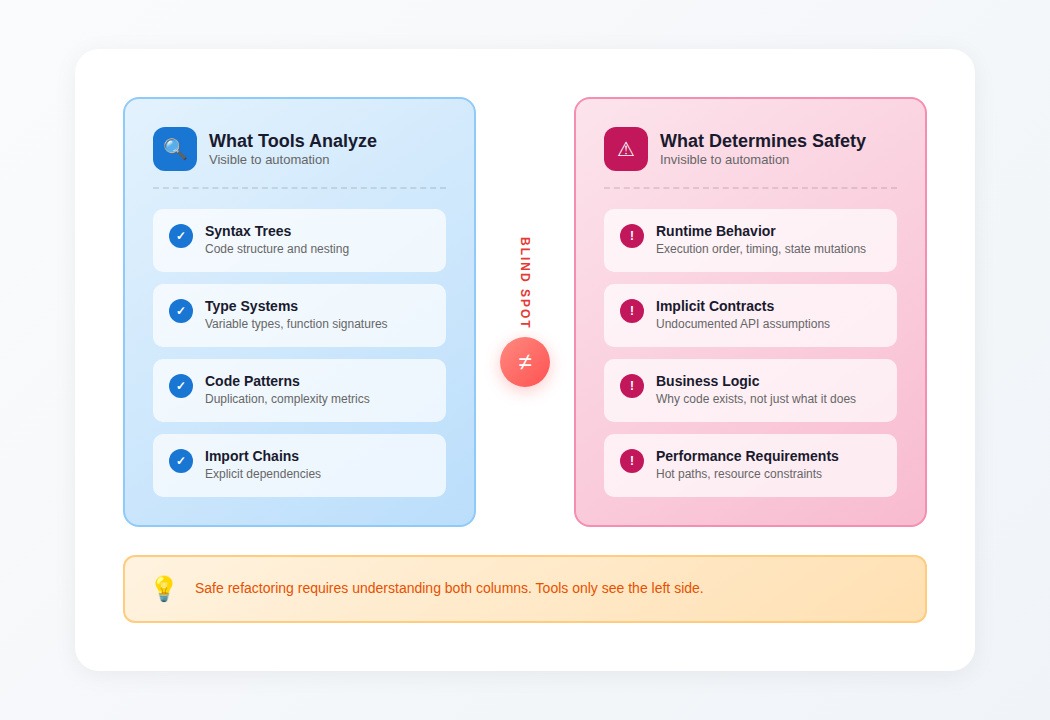
What tools analyze
- Syntax trees: Code structure and nesting
- Type systems: Variable types, function signatures
- Code patterns: Duplication, complexity metrics
- Import chains: Explicit dependencies
What determines safe refactoring
- Runtime behavior: Execution order, timing, state mutations
- Implicit contracts: Undocumented API assumptions
- Business logic: Why code exists, not just what it does
- Performance requirements: Hot paths, resource constraints
The gap between these columns is where refactoring tools break.
The context problem in practice
A refactoring tool confidently suggests extracting a payment calculation into a separate method. The extraction looks clean — eight lines of arithmetic pulled into a neat, reusable function. Tests pass. The PR gets approved.
Three days later, checkouts fail in certain tax jurisdictions. The extracted function runs in a slightly different execution context, changing when tax rate lookups occur. The original inline code relied on database state mutations happening in a specific sequence; the kind of timing dependency that can also cause database deadlocks under different conditions. The tool couldn't see that dependency because it existed only at runtime under specific production conditions.
This pattern repeats:
- Tools remove "dead code" that only executes under feature flags stored in external configuration
- Tools inline functions that were extracted specifically to maintain API compatibility
- Tools consolidate "duplicate" code blocks that were deliberately kept separate for regulatory reasons
- Tools extract methods without preserving assumptions about initialization order
How to use refactoring tools?
The failure modes are predictable. That makes them avoidable with the right workflow.
For IDE refactorings: trust but verify at boundaries
IDE refactorings are reliable within their scope. Problems emerge at module boundaries:
- After renaming, grep for string-based references (config files, reflection, dynamic imports)
- After moving files, verify build systems and deployment scripts still find them
- After extracting methods, confirm the new function is called from the same execution context
For static analysis: use findings as starting points, not prescriptions
Static analysis tells you where to look, not what to do.
When a linter flags complexity:
- Read the flagged code and understand why it's complex
- Determine if the complexity is accidental (can be simplified) or essential (reflects genuine business logic)
- If simplifying, design the refactoring yourself — don't accept auto-fixes blindly
Treat metrics as conversation starters. "This function has high cognitive complexity" is useful. "Click here to auto-fix" usually isn't.
For AI-assisted refactoring: constrain scope aggressively
AI refactoring accuracy degrades with scope. Keep generations small:
- One function at a time, not entire modules
- Provide full context for the code being changed
- Review every line as if a junior developer wrote it
- Test edge cases explicitly — AI optimizes for common patterns
- Never use AI suggestions for security-critical code without manual verification
When AI suggests a refactoring you don't fully understand, that's a signal to reject it, not accept it faster.
For all tools: Refactor with tests, not instead of them
No refactoring tool guarantees behavior preservation. Your test suite does—if it covers the behavior that matters.
Before refactoring:
- Ensure tests cover the code paths being changed
- Add tests for edge cases you discover while reading the code
- Run tests after each transformation, not just at the end
- If tests don't exist and you can't add them, reconsider whether automated refactoring is safe
Why tool quality has a ceiling
The accuracy of AI-assisted refactoring tools gets determined during training, not during use. That ceiling comes down to the quality of the training data, not its quantity.
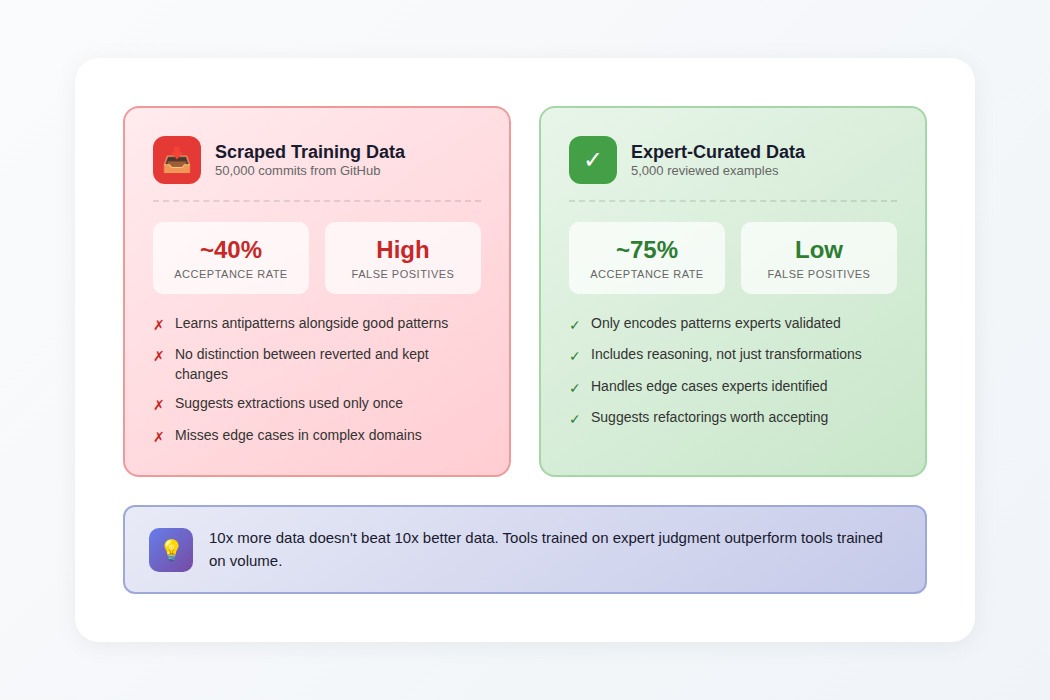
What models learn from
Refactoring tools train on examples: code before transformation, code after transformation. The model learns statistical patterns across those examples, not explicit rules, not reasoning about why transformations are appropriate — a form of in-context learning applied to code patterns.
When training data includes bad examples, the model learns bad patterns. Teams prepare training data by scraping commits that changed variable names; the model learns that developers often rename temp to temporary_value—a real pattern in the data, and a terrible suggestion.
Why expert curation beats volume
Tools trained on 5,000 expert-reviewed refactoring examples consistently outperform tools trained on 50,000 scraped examples:
- Higher suggestion acceptance rates
- Fewer false positives
- Better handling of edge cases
- Suggestions worth actually implementing
The economics look unfavorable initially; why pay for expert review when you can scrape millions of examples for free? Because scraped data contains every antipattern, every reverted change, every expedient hack disguised with a clean commit message. The model learns from all of it equally.
Expert-curated examples encode better patterns from the start. The distinction between "refactoring that improves maintainability" and "refactoring that just moves complexity around" comes from training data created by people who understand the difference.
Contribute to AI tool training at DataAnnotation
The refactoring tools reshaping how developers work depend on training data quality. When a model learns to suggest refactorings worth accepting (transformations that actually improve code rather than just rearranging it) that capability traces directly to human expertise in the training process.
The judgment that separates useful refactoring from textbook-correct-but-actually-harmful transformations is exactly what's scarce: understanding why code exists in its current form, not just what mechanical changes are syntactically valid.
Technical expertise, domain knowledge, or the critical thinking to evaluate complex trade-offs all position you well for AI training work at DataAnnotation. Developers looking for part-time work that exercises real technical judgment find code evaluation particularly well-matched to their skills. Over 100,000 remote workers contribute to this infrastructure.
Getting from interested to earning takes five straightforward steps:
- Visit the DataAnnotation application page and click "Apply"
- Fill out the brief form with your background and availability
- Complete the Starter Assessment, which tests your critical thinking skills
- Check your inbox for the approval decision (typically within a few days)
- Log in to your dashboard, choose your first project, and start earning
No signup fees. DataAnnotation stays selective to maintain quality standards. You can only take the Starter Assessment once, so read the instructions carefully and review before submitting.
Apply to DataAnnotation if you understand why quality beats volume in advancing frontier AI, and you have the expertise to contribute.
.jpeg)